
Anime vs Anime! Codes and How to Redeem Them
Check reported Anime vs Anime! codes and rewards, and learn how to redeem them on the Summon screen.
Quick answer
After completing the tutorial, open the Summon screen, enter a code in the field at the bottom, and press REDEEM. The lists below show reported codes and rewards; a reported status is not an in-game test.
Reported Anime vs Anime! codes
Code list at a glance
A source-check date is not an expiry date. Codes can expire without warning.
Reported working codes
200CCU!Source checked:
87_StarSource checked:
87_Star!Source checked:
aaa503mSource checked:
ABSTRAKTSource checked:
BetterUpdateTomorrowSource checked:
Bill1k?Source checked:
DeuExSource checked:
DillonAndLThankYouSource checked:
DokiDokiSource checked:
DokiDoki!Source checked:
goatedpatSource checked:
KizaruSource checked:
LfGhostinSource checked:
Merr!Source checked:
SauDeepSource checked:
SLIME!Source checked:
SorryForBadUpdateSource checked:
xennseiSource checked:
| Code (click to copy) | Rewards | Status | Source checked |
|---|---|---|---|
200CCU! | 10,000 Coins | Reported active | |
87_Star | 1 Apex Pack | Reported active | |
87_Star! | 1 Apex Pack | Reported active | |
aaa503m | 5,000 Coins | Reported active | |
ABSTRAKT | 5,000 Coins | Reported active | |
BetterUpdateTomorrow | 2 GOD packs | Reported active | |
Bill1k? | 5,000 Coins | Reported active | |
DeuEx | 1 Apex Pack | Reported active | |
DillonAndLThankYou | 1 Apex Pack | Reported active | |
DokiDoki | 1 Apex Pack | Reported active | |
DokiDoki! | 1 Apex Pack | Reported active | |
goatedpat | 5,000 Coins | Reported active | |
Kizaru | 5,000 Coins | Reported active | |
LfGhostin | 1 Apex Pack | Reported active | |
Merr! | 1 Apex Pack | Reported active | |
SauDeep | 1 Apex Pack | Reported active | |
SLIME! | 5,000 Coins | Reported active | |
SorryForBadUpdate | 3 GOD packs | Reported active | |
xennsei | 20 Emeralds | Reported active |
Enter each code exactly as shown: capitalization and punctuation matter. Copying from the table can help avoid typos.
How to redeem Anime vs Anime! codes
- Launch Anime vs Anime in Roblox.
- Complete the game's tutorial if you haven't already.
- Press the SUMMON button on the left side of the screen, or walk up to the Summon section in the main lobby.
- Type the code into the text field at the bottom of the screen that pops up.
- Press REDEEM. A code that is still active delivers its rewards instantly.
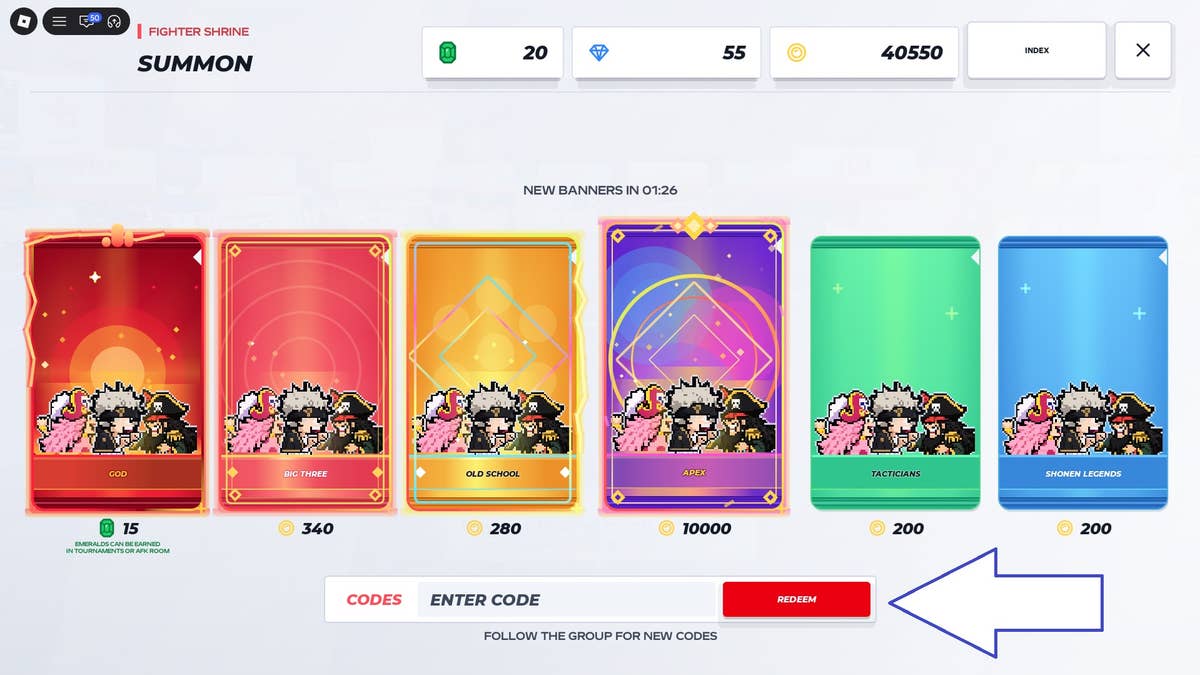
What code rewards are used for
Coins and Apex Packs can be used when summoning fighters; Apex Packs may hold rare and powerful characters. For more on summoning, see the Anime vs Anime! summoning guide. The beginner guide is a useful companion if you are new to the game.
Anime vs Anime! code not working?
Problems and fixes
The code is rejected
A typo in its spelling, capitalization or punctuation
Suggested responseCopy and paste the code from the table and try again
A brand-new code does nothing
New codes may not work on every server immediately
Suggested responseClose and reopen the game or join a different server, then try again
It still fails after both checks
The code may have expired
Suggested responseCheck its reported status and try another code
Reported expired codes
Expired codes
BillNYETheScienceGuySource checked:
| Code (click to copy) | Rewards | Status | Source checked |
|---|---|---|---|
BillNYETheScienceGuy | 5,000 Coins | Reported expired |
Where to find new Anime vs Anime! codes
The developers announce new codes in the game's Discord server, which has a dedicated codes channel. Guides also recommend checking the SellWater! Roblox group. For a record of game changes, see the updates page.
Sources and check records
Reported statuses reflect source listings. Tested statuses reflect in-game redemption checks. Source-check dates are shown beside each code.
- rocodes.gg
200CCU!· Source checked:87_Star· Source checked:87_Star!· Source checked:aaa503m· Source checked:ABSTRAKT· Source checked:BetterUpdateTomorrow· Source checked:Bill1k?· Source checked:DeuEx· Source checked:DillonAndLThankYou· Source checked:DokiDoki· Source checked:DokiDoki!· Source checked:goatedpat· Source checked:Kizaru· Source checked:LfGhostin· Source checked:Merr!· Source checked:SauDeep· Source checked:SLIME!· Source checked:SorryForBadUpdate· Source checked:xennsei· Source checked:
- Pro Game Guides — Anime vs Anime Codes [RIMURU!] (Oct 29, 2026)
BillNYETheScienceGuy· Source checked:
- Anime vs Anime codes (October 2026)
BillNYETheScienceGuy· Source checked:
- Anime vs Anime codes October 2026
BillNYETheScienceGuy· Source checked:
Related Guides
Summon Screen and Void Pack Price
Find the SUMMON button after the tutorial, read the six-pack banner and Codes box, and check the Void pack's reported 6,100-Coin price.
Anime vs Anime! Apex Packs: Which Codes Give One and What the Pack Contains
Four active Anime vs Anime! codes each award 1 Apex Pack: LfGhostin, SauDeep, DokiDoki and 87_Star. How to redeem them at the Summon screen, what the pack's description actually promises, and how it differs from the Coin-priced packs on the banner.
Anime vs Anime! How to Get Coins and What to Spend Them On
Coins in Anime vs Anime! come from active codes and match play, plus optional store purchases. See how each route works and what Coins buy.
Game Updates
Explore the known history of Anime vs Anime!, including its Roblox game record.