
Anime vs Anime! Beginner Guide: From Tutorial to Your First Match
A first-timer's path through Anime vs Anime!: finish the tutorial, summon fighters with the SUMMON button, learn the battle controls and start your first 1v1, 2v2 or Training match.
Anime vs Anime! is a 2D fighting game on Roblox where you summon anime fighters, grow a roster of more than 80 characters and battle other players. Your first session covers all of that in miniature: a short tutorial that puts you straight into a fight, the SUMMON button that builds your collection, and your first 1v1, 2v2 or Training round.
Quick answer
Launch Anime vs Anime! in Roblox, complete the tutorial, click the SUMMON button on the left side of the screen to get fighters, then take them into a 1v1 or 2v2 match — or into Training mode to learn a move set without pressure.
Your first session, step by step
Checklist
- Launch Anime vs Anime! in Roblox
Start the game from its Roblox page and load into the lobby.
- Complete the tutorial
You pick a character from five random fighters already in your collection, then fight another character using that fighter's special moves.
- Click SUMMON in the lobby
The button is on the left side of the screen; summoning opens packs that add fighters to your collection.
- Start your first match or Training
Fight other players in 1v1 or 2v2, or practice in Training mode.
The tutorial doubles as your first taste of combat. Instead of a text walkthrough, it hands you a character drawn from five random fighters in your collection and has you fight another character with that fighter's special moves — so by the time you reach the lobby, you have already moved, attacked and thrown specials in a real fight.
Mechanically, that is the whole loop in miniature: summoning opens packs of random fighters, each pull adds a character to your collection, and those characters are what you take into a fight — which is exactly what the next section covers.
One player who documented their first session reported that finishing the tutorial unlocked a God Pack, from which they pulled a Mythic Secret King of Curses. That is a single player's report rather than a guaranteed, fixed reward — but it shows the tutorial is worth playing properly rather than clicking through.
Summoning fighters and what you are collecting
Summoning is the heart of the game. Anime vs Anime! has more than 80 fighters to collect, and each one has its own moves, ultimate and awakening. Packs are how new fighters join your roster: the SUMMON button you used in the lobby opens them, and what you pull decides which fighters you can take into battle.
Once you have a few names on the roster, the summoning guide goes deeper into packs.
The "Rolling Your Fighters" screen before a match
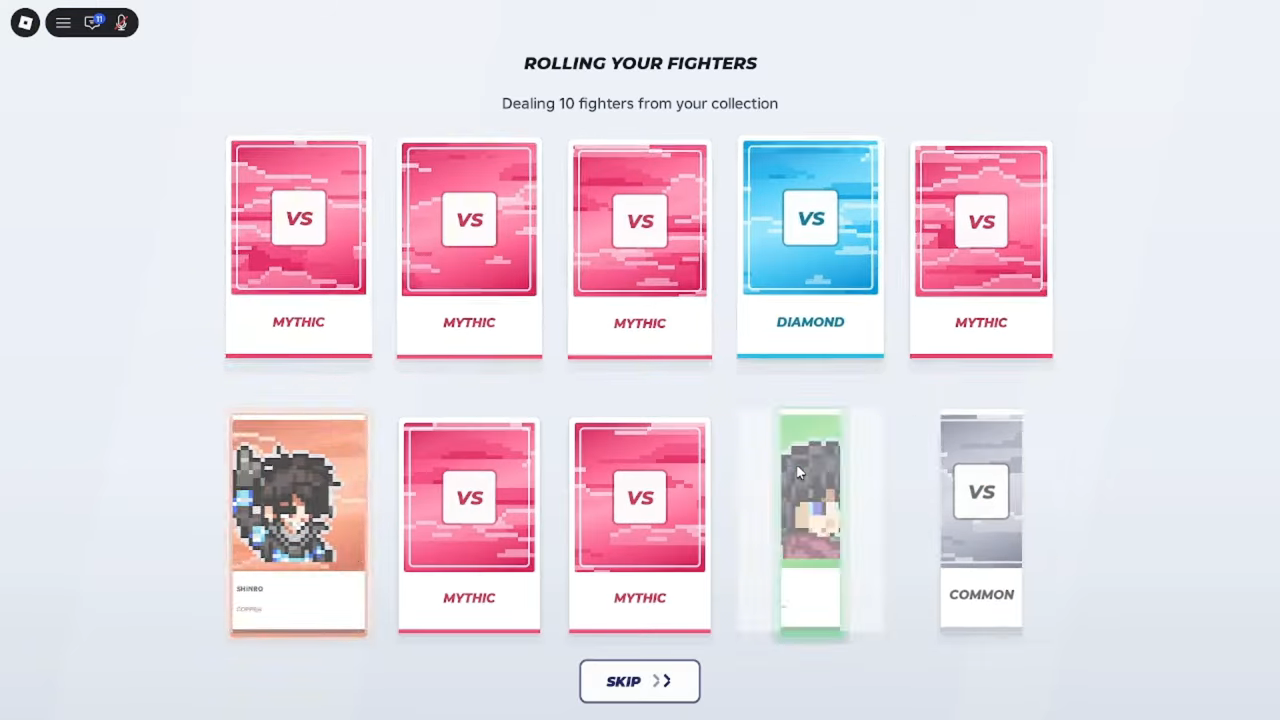
Right before a fight starts, a screen titled "ROLLING YOUR FIGHTERS" appears with the subtitle "Dealing 10 fighters from your collection". Ten cards are dealt face down and flipped one by one, showing rarity labels such as MYTHIC, DIAMOND and COMMON, and a revealed card can carry a COPY tag. The deal plays out from your collection, and the screen shows a SKIP button if you would rather move straight to the action. Once the roll finishes, the fight begins.
Battle controls: the HUD legend
During a fight, the battle screen shows a control legend, so the inputs are always on screen:
Data table
- Input
- A / D
- Action
- Move
- Input
- W
- Action
- Jump
- Input
- Left Click / J
- Action
- Attack
- Input
- F
- Action
- Block
- Input
- Q
- Action
- Dash
- Input
- 1 / 2 / 3
- Action
- Moves
- Input
- V
- Action
- Ult
- Input
- C
- Action
- Awaken
The same screen keeps the state of the fight in view: both fighters' health, a round timer, your numbered move cards 1, 2 and 3, and a separate V move card with its own charge meter. If all of that feels like a lot in your first match, Training is the place to read the HUD at your own pace.
Control it yourself or use Auto Fight
At the bottom left of the battle HUD sits an AUTO/CONTROL toggle. On CONTROL, you play the fighter yourself with the inputs above; on AUTO, the game's Auto Fight plays for you. The official game description puts the choice plainly: "Control your fighter or set it to Auto Fight!"
While you are still learning a fighter, controlling them yourself — in a match or in Training — is the direct way to connect the HUD legend to what your fighter actually does. The toggle stays there for whenever you would rather let Auto Fight handle a battle.
Picking your first mode: 1v1, 2v2 or Training
Anime vs Anime! gives you three ways to use your fighters: battle other players in 1v1, fight in 2v2, or practice in Training mode. Training is the low-pressure option, presented as the place to learn a fighter's move set without a live match at stake.
A comfortable first-session order is to try a freshly summoned fighter's moves in Training, queue your first 1v1 once the inputs feel familiar, and then give 2v2 a shot when you want team fights. The combat guide covers the fighting itself.
1v1, 2v2 and Training are the ways to fight that the game's own description names, alongside opening packs and collecting fighters; this guide doesn't establish whether other match types exist, so don't assume a ranked queue, tournament or anything similar is waiting. One boundary worth knowing: 2v2 is named as a format, but how teams or partners are formed isn't documented. And the battle HUD shows a health bar for each fighter, with no mode label visible, so note which option you entered with before judging a result from the fight screen alone.
Coins, Packs and where codes fit
You earn Coins and Packs as you play, which feeds straight back into summoning. Codes can grant additional Coins and Packs, and developer SellWater! usually announces new ones in the game's official Discord server. Codes are a bonus on top of playing, not a step you must complete before your first match — but if you want the head start, the current list and redemption steps live on our Anime vs Anime! codes page, and the currency guide explains Coins and Packs in more depth.
From there, the loop is the same one you started in your first session: play, earn, summon, and grow your roster toward all 80+ fighters.
Related Guides
Summon Screen and Void Pack Price
Find the SUMMON button after the tutorial, read the six-pack banner and Codes box, and check the Void pack's reported 6,100-Coin price.
Manual Controls and Auto Fight
Learn the keyboard and mouse inputs for manual fighting, then locate the HUD toggle that switches battles to Auto Fight.
Codes and Redemption
Check reported codes and rewards, then learn how to redeem them on the Summon screen.
Coins, Emeralds and Apex Packs
Learn how Coins, Apex Packs and Emeralds are obtained, and how Coins and packs are used at the Summon screen.